Best Time Tracking Tools for Faster Freelancer Invoicing
Find the best time tracking software for freelancers that helps create invoices faster, reduce manual work, and improve billing accuracy with simple workflows.
Small businesses lose between 1% and 8% of their total payroll each year to manual time-tracking errors. That's thousands of dollars walking out the door every single year. The right time tracking software stops that automatically. The best time-tracking software for small and medium businesses is affordable, easy to use, and integrates with your payroll or accounting tool. For most small teams in 2026, Clockify is the top free choice. QuickBooks Time is the best pick if you already use QuickBooks for payroll. Toggl Track is the easiest to set up and adopt across a team.
According to the American Payroll Association, manual payroll errors cost businesses between 1% and 8% of total payroll each year. Switching to automated time tracking can cut those errors by up to 60% (Lift HCM). Most small businesses see a return on their investment within six months (Factorial HR, 2025).
This guide is for: small business owners managing hourly employees, operations managers running field or remote teams, and accountants looking to reduce payroll errors and manual data entry.
Here’s a quick comparison of the best time tracking tools for small businesses, including pricing, free plans, and ideal use cases.
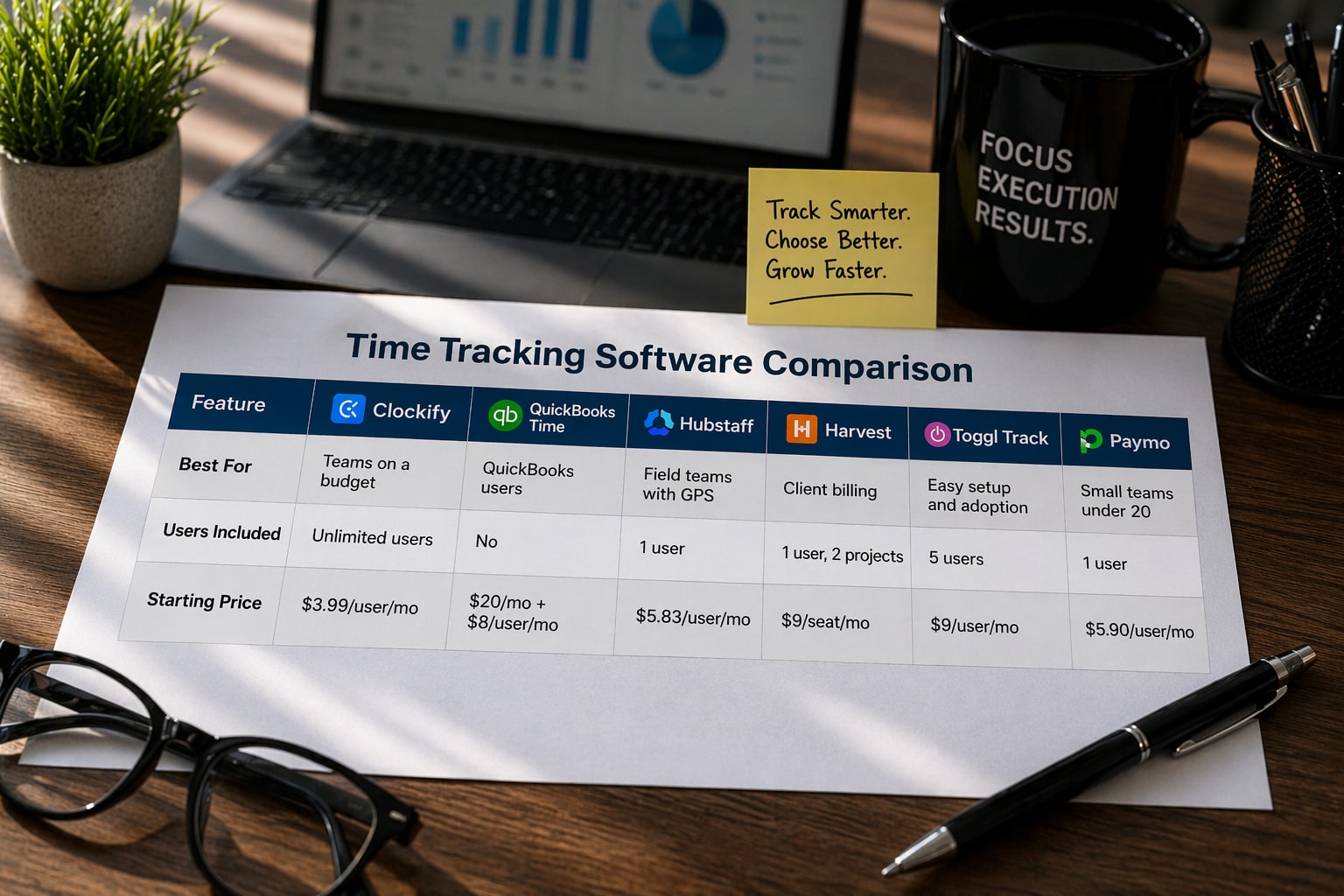
Tool | Best For | Free Plan | Starting Price (annual) |
Clockify | Teams on a budget | Unlimited users | $3.99/user/mo |
QuickBooks Time | QuickBooks users | No | $20/mo + $8/user/mo |
Hubstaff | Field teams with GPS | 1 user | $5.83/user/mo |
Harvest | Client billing | 1 user, 2 projects | $9/seat/mo |
Toggl Track | Easy setup and adoption | 5 users | $9/user/mo |
Paymo | Small teams under 20 | 1 user | $5.90/user/mo |
Choose a tool based on how your team works. Clockify fits budget teams, QuickBooks Time works best for payroll, and Hubstaff is stronger for field teams.
Free forever for unlimited users. No per-seat fees. Paid plans start at $3.99 per user per month. Includes invoicing, scheduling, and QuickBooks integration on the Standard plan ($5.49/user/month).
This is the native Intuit time tracking product. It connects directly with QuickBooks Payroll and QuickBooks Online. It is included free with QuickBooks Payroll Premium and Elite plans. Standalone pricing starts at a base of $20/month plus $8 per user per month. Includes GPS, kiosk mode, and scheduling.
GPS tracking, geofencing, built-in payroll, and overtime alerts. Supports both QuickBooks Online and Desktop. Plans from $5.83/user/month (annual). Strong for construction, cleaning, and delivery businesses.
Tracks time, creates invoices, and collects payment through Stripe or PayPal. Free plan available (1 user, 2 projects). Paid plans from $9/seat/month. Syncs with QuickBooks Online and Xero.
One-click timers on every device. Free for up to 5 users. Starter plan at $9/user/month adds billable rates and approvals. Over 145 integrations. Takes minutes to set up, not hours.
Project management plus time tracking plus invoicing in one tool. Free for 1 user. Plus plan at $10.90/user/month covers most small team needs. Includes Gantt charts and file proofing for creative teams.
Payroll connection: links to QuickBooks, Gusto, ADP, or Paychex to avoid manual data entry.
Overtime and FLSA alerts: required by law for hourly and non-exempt employees.
Mobile app: employees working off-site must be able to log time from their phone.
Simple interface: if it takes more than 15 minutes to train someone, adoption will suffer.
Project budget tracking: helps you see if a job is profitable before you finish it.
Approval workflow: managers review and approve timesheets before payroll runs.
The Fair Labour Standards Act (FLSA) requires all U.S. employers to keep accurate time records for non-exempt (hourly) employees. Violations can result in fines of up to $10,000 per violation. Time tracking software creates an automatic, auditable record that protects your business during labour disputes or Department of Labour audits.
For most small businesses, Clockify is the safest starting point — it's free, scales with your team, and connects with QuickBooks. If you're already on QuickBooks Payroll Premium, use QuickBooks Time — it's included at no extra cost. For field-based businesses, Hubstaff's GPS tracking pays for itself the first time it catches a false clock-in. Start with a 14-day trial and track one real payroll cycle before committing.
To run accurate payroll, stay compliant with FLSA, control costs across projects, and understand where working hours go each week.
Yes. Most small businesses save 2+ hours per payroll run and reduce payroll mistakes by up to 60% after switching to automated tracking
Yes. Most tools connect with QuickBooks, ADP, Gusto, and Paychex. QuickBooks Time connects natively with QuickBooks Payroll.
Find the best time tracking software for freelancers that helps create invoices faster, reduce manual work, and improve billing accuracy with simple workflows.
Choose time tracking software with QuickBooks integration that keeps data accurate, avoids sync issues, and protects your workflow.
Automate HR tasks like attendance, payroll, and reporting with time tracking software without making employees feel watched.
Improve team productivity with time tracking software. Track work, reduce delays, and help SMEs manage workflows with better visibility and control.