Best Time Tracking Tools for Faster Freelancer Invoicing
Find the best time tracking software for freelancers that helps create invoices faster, reduce manual work, and improve billing accuracy with simple workflows.
Time tracking software helps you record how long you and your team spend on tasks, projects, and clients. It replaces paper timesheets and spreadsheets with automatic timers, digital logs, and reports. You can use the data to run payroll, bill clients, and spot where time is being lost.
The global market for these tools reached $3.35 billion in 2025 and is growing at 17.5% per year (Mordor Intelligence). Remote and hybrid work has pushed adoption higher. Today, 88% of large companies and 56% of small businesses use some form of workforce management software (IMARC Group).
Here’s a quick side-by-side look at the top time tracking tools in 2026, including who they fit best, their free plans, pricing, and trial periods.
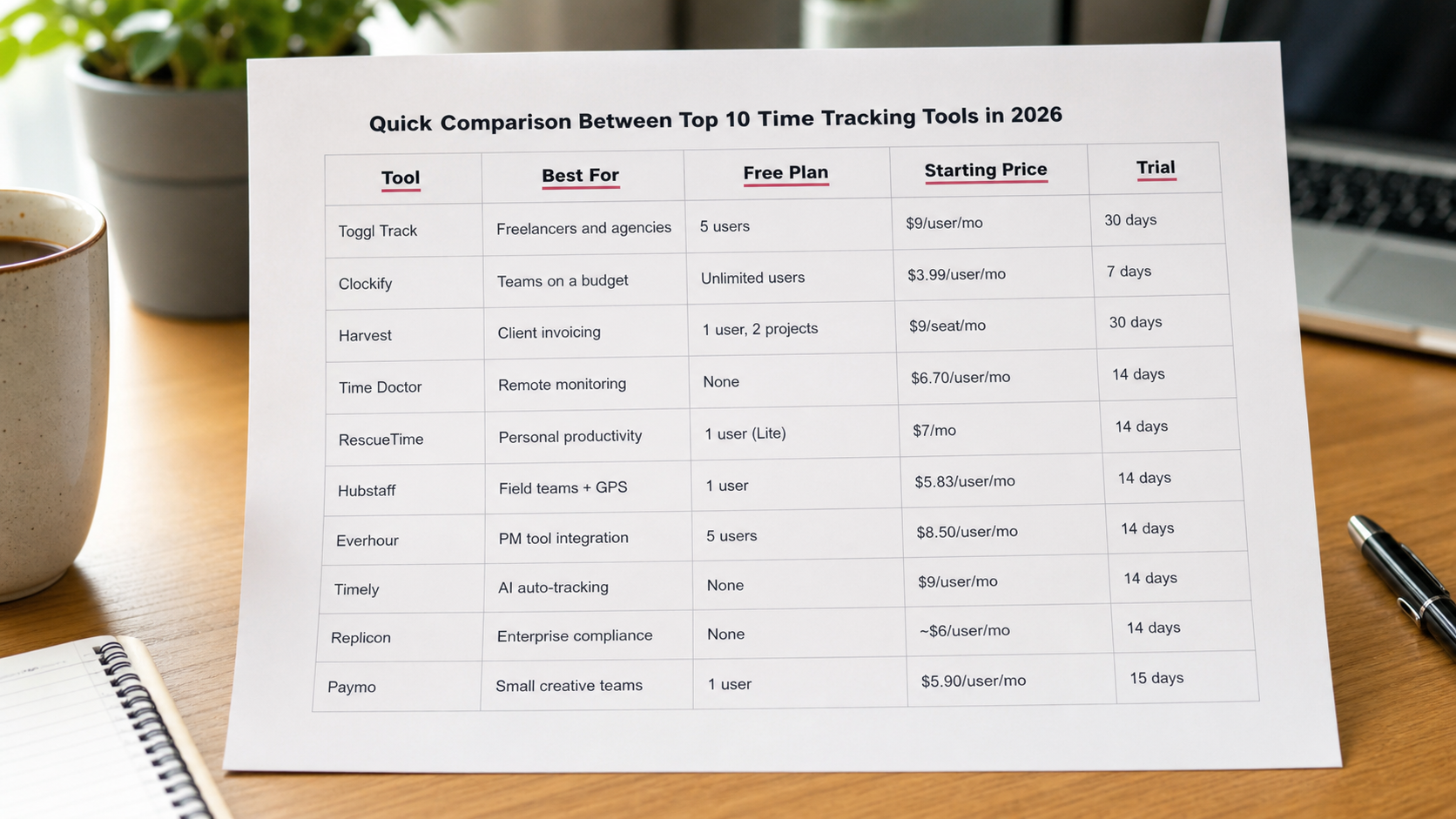
Tool | Best For | Free Plan | Starting Price | Trial |
|---|---|---|---|---|
Toggl Track | Freelancers and agencies | 5 users | $9/user/mo | 30 days |
Clockify | Teams on a budget | Unlimited users | $3.99/user/mo | 7 days |
Harvest | Client invoicing | 1 user, 2 projects | $9/seat/mo | 30 days |
Time Doctor | Remote monitoring | None | $6.70/user/mo | 14 days |
RescueTime | Personal productivity | 1 user (Lite) | $7/mo | 14 days |
Hubstaff | Field teams + GPS | 1 user | $5.83/user/mo | 14 days |
Everhour | PM tool integration | 5 users | $8.50/user/mo | 14 days |
Timely | AI auto-tracking | None | $9/user/mo | 14 days |
Replicon | Enterprise compliance | None | ~$6/user/mo | 14 days |
Paymo | Small creative teams | 1 user | $5.90/user/mo | 15 days |
The best tool depends on your team size, budget, and workflow. Use this comparison to shortlist the options that match your daily tracking and reporting needs
Detailed Reviews: The 10 Best Time Tracking Tools in 2026
Toggl Track is one of the easiest time trackers to use. It has a one-click timer that works on web, desktop (Windows, Mac, Linux), and mobile. There are no screenshots or activity monitoring. The tool focuses on trust, not surveillance.
It connects with over 145 other apps, which is more than any other tool on this list. The desktop Autotracker records which apps you use, but only you can see that data. Managers see approved timesheets only.
Best For | Freelancers, agencies, and remote teams who want simple and private tracking |
Key Features | One-click timer, 145+ integrations, desktop Autotracker, project forecasting, timesheet approvals |
Pricing | Free (5 users) | Starter $9/user/mo | Premium $18/user/mo | Enterprise: custom |
Free Trial | 30 days, no credit card needed |
Ratings | G2: 4.6/5 (1,573 reviews) | Capterra: 4.7/5 (2,562 reviews) |
Limitations | No GPS tracking, no screenshots, invoicing requires a third-party tool |
Clockify has the most generous free plan in this category. You get unlimited users, unlimited projects, and unlimited time tracking at no cost, forever. Paid plans start at just $3.99 per user per month, making it the most affordable full-featured tool on this list.
It also includes kiosk mode for shared time clocks, GPS tracking on higher plans, invoicing, and scheduling. You can choose where your data is stored: EU, UK, USA, or Australia.
Best For | Teams of any size looking for zero-cost or low-cost tracking |
Key Features | Unlimited free plan, kiosk mode, GPS (Pro plan and above), invoicing, multi-region data storage |
Pricing | Free (unlimited) | Basic $3.99 | Standard $5.49 | Pro $7.99 | Enterprise $11.99 (per user/mo, annual) |
Free Trial | 7-day Pro trial, no credit card needed |
Ratings | G2: 4.5/5 (174 reviews) | Capterra: 4.8/5 (9,161 reviews) |
Limitations | Invoicing requires Standard plan; QuickBooks requires Standard plan; no SOC 2 Type II certification |
Harvest makes it easy to turn tracked hours into invoices and collect payment. You can track time, create invoices, collect payment via Stripe or PayPal, and sync everything to QuickBooks or Xero in one workflow. Over 70,000 companies have used it for 15+ years.
Note: Harvest was bought by Bending Spoons in 2024 and changed its pricing. Many users on G2 and Capterra report price increases at renewal. Check current rates before signing up.
Best For | Agencies and consultants who bill clients by the hour |
Key Features | Time-to-invoice workflow, Stripe/PayPal payment collection, expense tracking, project budgets |
Pricing | Free (1 seat, 2 projects) | Teams from $9/seat/mo | Enterprise from $14/seat/mo (annual) |
Free Trial | 30 days, no credit card needed |
Ratings | G2: ~4.3/5 | Capterra: 4.6/5 (644 reviews) |
Limitations | Free plan very limited (1 user, 2 projects); no automatic tracking; price increases post-acquisition |
Time Doctor is built for companies that manage remote and hybrid teams. It tracks which apps and websites employees use, takes screenshots, and flags unusual activity, such as mouse jiggling or keyboard simulators. Its AI tool uses data from 250,000+ users to give productivity benchmarks.
It has 60+ integrations and flexible settings. Screenshots can be blurred or turned off. Employees can see exactly what is being tracked.
Best For | Remote and hybrid teams that need documented productivity data |
Key Features | Unusual activity detection, AI benchmarks, screenshots, 60+ integrations, flexible privacy settings |
Pricing | Basic $6.70 | Standard $11.70 | Premium $16.70 (per user/mo, annual). AI add-on: $3/user/mo extra |
Free Trial | 14 days, full Premium features, no credit card needed |
Ratings | G2: 4.4/5 (472 reviews) | Capterra: 4.5/5 (544 reviews) |
Limitations | Can slow older computers; no GPS tracking; no invoicing; no native QuickBooks integration |
RescueTime is different from every other tool on this list. It runs in the background and records what apps and websites you use automatically. No timers needed. Only you can see your full activity timeline. Managers see only approved timesheets.
It also blocks distracting websites during focus sessions and gives you a daily Productivity Pulse score from 0 to 100.
Best For | Individuals who want automatic time insights with no manual effort |
Key Features | Background auto-tracking, FocusTime distraction blocker, Productivity Pulse score, privacy-first design |
Pricing | Free (Lite, forever) | Solo Focus $7/mo | Solo+ $12/mo | Team+ $16/user/mo (annual) |
Free Trial | 14-day trial (credit card required) |
Ratings | G2: 4.1/5 (94 reviews) | Capterra: 4.6/5 (141+ reviews) |
Limitations | Poor mobile app ratings; no GPS, invoicing, or payroll; no QuickBooks integration |
Hubstaff combines time tracking with GPS tracking, geofencing, scheduling, payroll, and invoicing in one place. It is a strong choice for field-based businesses in construction, delivery, and services. It is one of only two tools on this list that works with both QuickBooks Online and QuickBooks Desktop.
You can set up automatic clock-in and clock-out when employees arrive at or leave a job site. Built-in payroll supports PayPal, Wise, Gusto, Deel, and more.
Best For | Field service businesses, remote teams, and companies that need GPS and built-in payroll |
Key Features | GPS + geofencing, built-in payroll, QuickBooks Online + Desktop, scheduling, overtime tracking |
Pricing | Free (1 user) | Starter $5.83 | Grow $7.50 | Team $10 | Enterprise $25 (per user/mo, annual) |
Free Trial | 14 days, no credit card needed. 30-day money-back guarantee |
Ratings | G2: 4.5/5 (1,576 reviews) | Capterra: 4.6/5 (1,583 reviews) |
Limitations | Key features locked to higher plans; add-ons increase costs; minimum 2 users on paid plans |
Everhour puts timer buttons directly inside your project management tools. It works inside Asana, Jira, ClickUp, Trello, Monday.com, Notion, GitHub, Linear, and Basecamp. You do not need to switch to a separate app to log time. This is why it reports around a 95% team adoption rate.
Project budgets update in real time. You get alerts at 75%, 90%, and 100% of your budget. Invoices export directly to QuickBooks Online, Xero, or FreshBooks.
Best For | Teams already using Asana, Jira, ClickUp, or other project management tools |
Key Features | In-app timer buttons, real-time budget alerts, flat pricing, QuickBooks Online export |
Pricing | Free (up to 5 seats) | Team $8.50/user/mo (5-seat minimum, annual) | Custom for 50+ seats |
Free Trial | 14 days, all features, no credit card needed |
Ratings | G2: 4.7/5 (90+ reviews) | Capterra: 4.7/5 (431 reviews) |
Limitations | 5-seat minimum on paid plan; no Android app; free plan has no integrations |
Timely uses AI to record all your digital activity in the background. Its AutoSheet tool then drafts your timesheets from that data. You only need about 10 minutes a week to review and approve entries. Only you see your full activity. Managers see approved hours only.
Timely supports 50+ currencies and works well for teams across multiple countries. It is used by 5,000+ businesses in 160 countries.
Best For | Consultants and agencies who want automatic AI tracking with no manual timers |
Key Features | AI Memory auto-tracker, AutoSheet timesheet drafting, multi-currency, privacy-first design |
Pricing | Starter $9/user/mo | Premium $16/user/mo | Unlimited $22/user/mo | Enterprise: custom (annual) |
Free Trial | 14 days, all features, no credit card needed |
Ratings | G2: 4.8/5 | Capterra: 4.7/5 (217 reviews) |
Limitations | No free plan; Starter limited to 5 users and 20 projects; QuickBooks only on Premium plan and above |
Replicon, now part of Deltek, is built for large companies with complex needs. Its ZeroTime AI captures time from 100+ work apps. It covers labor laws in 145+ countries. It also has FedRAMP Moderate approval and supports DCAA-compliant timesheets for government contractors.
Pricing is modular. You pay only for the parts you need: project time, time and attendance, expenses, or leave management.
Best For | Enterprise and mid-market companies with government contracts or global operations |
Key Features | ZeroTime AI, 145+ jurisdiction compliance, FedRAMP Moderate, QuickBooks Online + Desktop support |
Pricing | Modular: $6 to $49 per user/mo depending on chosen modules. TimeBill Quick Start from $60/mo (5 users) |
Free Trial | 14-day trial and guided demo available |
Ratings | G2: 4.3/5 | Capterra: 4.5/5 (531 reviews) |
Limitations | Complex setup; no free plan; outdated interface compared to newer tools; lengthy implementation |
Paymo combines project management, time tracking, and invoicing in one tool. It works best for small teams up to 20 people. Creative agencies, studios, and consulting firms use it most. It includes file proofing, Gantt charts, and automatic scheduling features.
Time can be tracked via timer, manual entry, or the automatic Paymo Track desktop app. Invoices are created from tracked hours and can be sent to QuickBooks Online, Xero, Stripe, or PayPal.
Best For | Small creative teams that want project management, time tracking, and invoicing in one place |
Key Features | File proofing, Portfolio Gantt charts, ghost bookings, automatic desktop tracking, invoicing |
Pricing | Free (1 user) | Solo $5.90/mo | Plus $10.90/user/mo | Pro $16.90/user/mo (annual) |
Free Trial | 15 days, no credit card needed |
Ratings | G2: 4.7/5 | Capterra: 4.7/5 (686 reviews) |
Limitations | Free and Solo plans limited to 1 user; no custom fields; cannot import Excel data |
Web and mobile apps (iOS and Android) with sync across all devices
Start/stop timers and manual time entry
Timesheet export (CSV, PDF, Excel)
Billable vs. non-billable hour tracking with custom rates
Project and task-based time logging
Basic reports: summary, detailed, and by client/project
Integration with QuickBooks, Xero, or another accounting tool
Overtime alerts and labor law compliance tools
Timesheet approval workflow: submit, review, approve
PTO and leave tracking
Project budget tracking with threshold alerts
Built-in invoicing from tracked hours
Break tracking and idle detection
Reminders for missing or incomplete timesheets
GPS tracking and geofencing for field workers
Kiosk mode for shared time clocks on site
AI automatic background tracking
Screenshot capture for remote accountability
Team scheduling and shift management
Resource planning and workload views
Think about your main use case. Do you need basic hour logging, client billing, employee monitoring, or full payroll integration? Start there.
Check your work setup. Office, remote, hybrid, or field? Field teams need GPS. Remote knowledge workers do better with automatic tracking.
List your current tools. Check that the tracker connects with your accounting software (QuickBooks, Xero), project tools (Asana, Jira), and payroll system (Gusto, ADP).
Work out total cost. Annual per-user pricing adds up. A 15-person team on Toggl Premium costs $3,240 per year. The same team on Clockify Basic costs $719 per year.
Run a proper trial. Every platform offers a free trial (7 to 30 days). Use it with real projects and real team members. Measure how many people use it daily, not just how many features it has.
Check compliance needs. U.S. employers must keep time records for all non-exempt employees under the Fair Labor Standards Act (FLSA). Global teams need country-specific compliance tools.
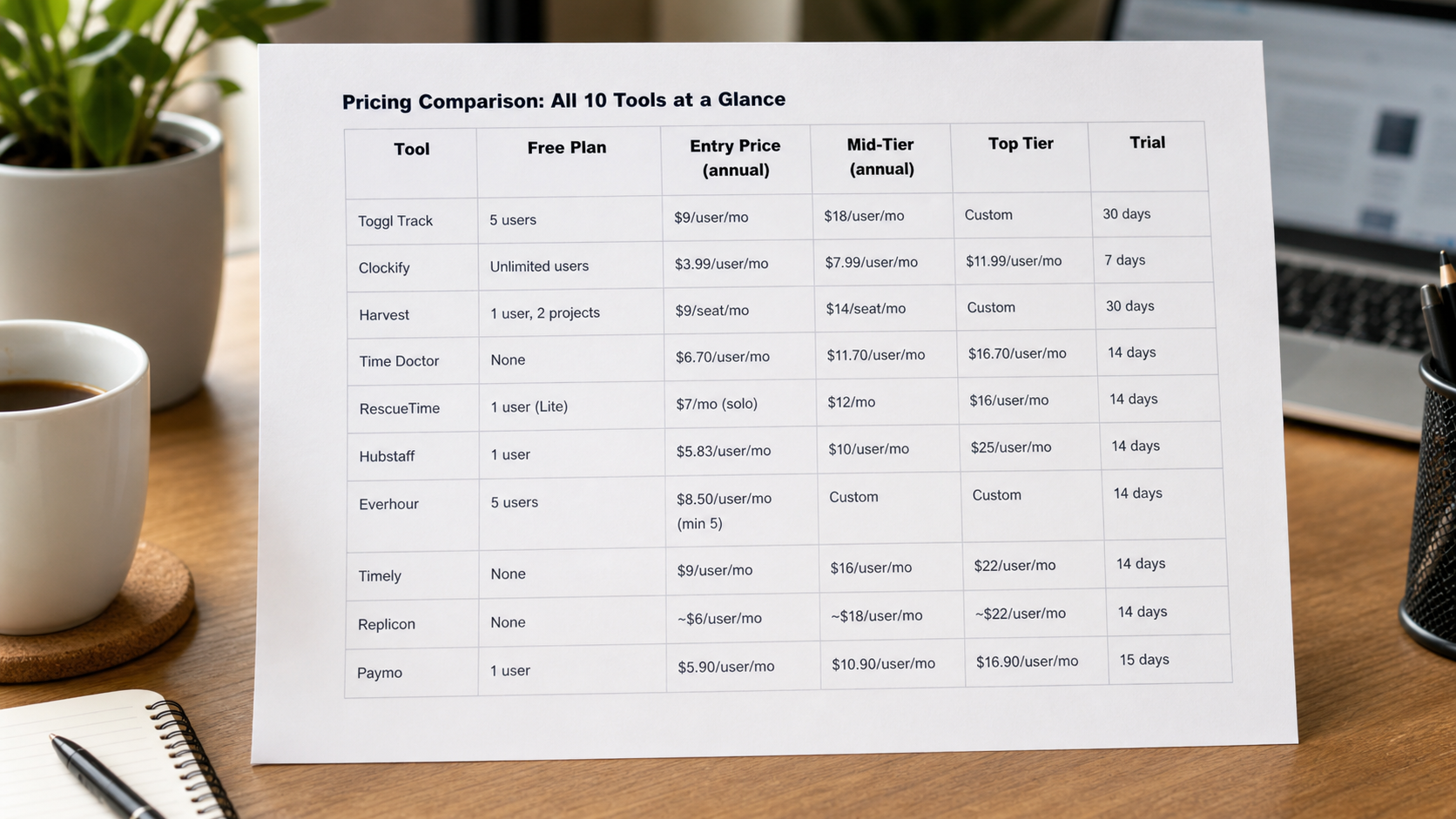
Tool | Free Plan | Entry Price (annual) | Mid-Tier (annual) | Top Tier | Trial |
Toggl Track | 5 users | $9/user/mo | $18/user/mo | Custom | 30 days |
Clockify | Unlimited users | $3.99/user/mo | $7.99/user/mo | $11.99/user/mo | 7 days |
Harvest | 1 user, 2 projects | $9/seat/mo | $14/seat/mo | Custom | 30 days |
Time Doctor | None | $6.70/user/mo | $11.70/user/mo | $16.70/user/mo | 14 days |
RescueTime | 1 user (Lite) | $7/mo (solo) | $12/mo | $16/user/mo | 14 days |
Hubstaff | 1 user | $5.83/user/mo | $10/user/mo | $25/user/mo | 14 days |
Everhour | 5 users | $8.50/user/mo (min 5) | Custom | Custom | 14 days |
Timely | None | $9/user/mo | $16/user/mo | $22/user/mo | 14 days |
Replicon | None | ~$6/user/mo | ~$18/user/mo | ~$22/user/mo | 14 days |
Paymo | 1 user | $5.90/user/mo | $10.90/user/mo | $16.90/user/mo | 15 days |
$3.35 billion: size of the global time tracking software market in 2025 (Mordor Intelligence)
17.5%: annual market growth rate, projected to reach $7.47 billion by 2030
75% of U.S. businesses are affected by time theft, costing up to 7% of annual payroll (American Payroll Association)
44% of employees admitted to adding 15 to 60 minutes to their timesheets at least once (QuickBooks Time survey)
1 in 5 U.S. payrolls contains at least one error, costing an average of $291 per error (Ernst and Young, 2022)
$274 million+ recovered by the U.S. Department of Labor in 2023 related to time recording and wage violations
47% productivity increase reported among employees using time tracking tools (Forbes-cited study)
60% reduction in payroll errors reported by companies using automated tracking (Lift HCM)
88% of freelancers and contractors now use time tracking tools (TimeChamp, 2026)
Choosing the right time tracking software depends on your team size, budget, and workflow. For most small teams, Clockify offers the best value. For agencies billing clients, Harvest is hard to beat. For AI-powered hands-free tracking, Timely leads the pack.
It depends on your needs. Toggl Track is best for ease of use. Clockify is best for free teams. Harvest is best for client billing. Hubstaff is best for GPS and field work. Timely is best for AI automatic tracking.
Yes. Clockify is free forever for unlimited users. Toggl Track is free for up to 5 users. RescueTime Lite is free for one person. Free plans limit advanced features like invoicing and approvals.
You log time with a start/stop timer, manual entry, or automatic background recording. The tool links your hours to projects and clients. You then use the data for reports, invoices, and payroll.
Yes. In the U.S., the FLSA requires employers to keep time records for non-exempt workers. Monitoring tools (screenshots, GPS) vary by state. Best practice is to tell employees clearly what is tracked.
Free plans exist (Clockify, Toggl, RescueTime). Paid plans range from $3.99 to $28 per user per month. Enterprise plans with compliance tools can cost more than $25 per user per month.
Toggl Track for manual tracking. Timely for fully automatic tracking with no timers required.
Yes. Most tools connect with QuickBooks, ADP, Gusto, and Paychex. Hubstaff has built-in payroll. QuickBooks Time has the deepest native QuickBooks Payroll connection.
Find the best time tracking software for freelancers that helps create invoices faster, reduce manual work, and improve billing accuracy with simple workflows.
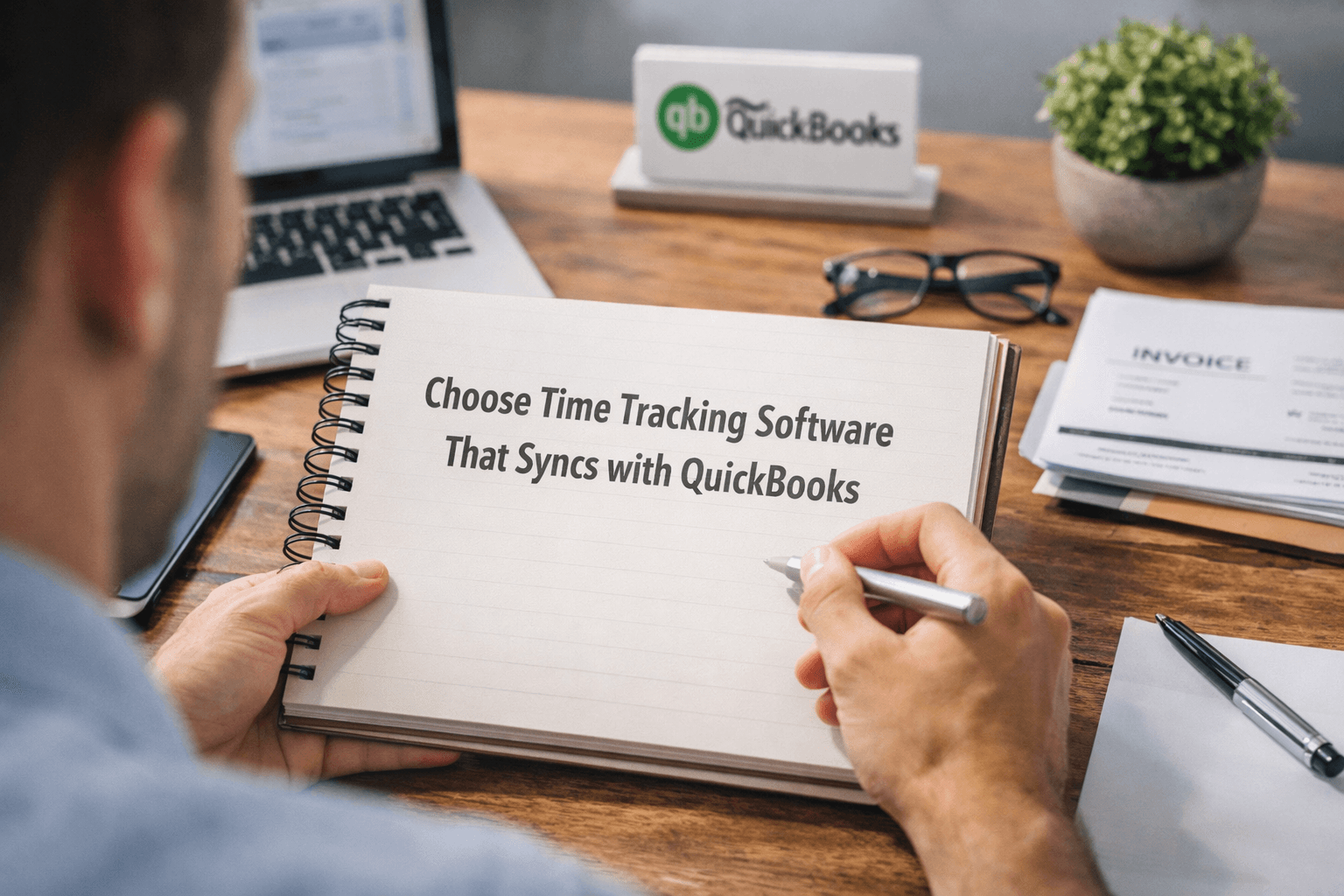
Choose time tracking software with QuickBooks integration that keeps data accurate, avoids sync issues, and protects your workflow.
Automate HR tasks like attendance, payroll, and reporting with time tracking software without making employees feel watched.
Improve team productivity with time tracking software. Track work, reduce delays, and help SMEs manage workflows with better visibility and control.