
Best Time Tracking Tools for Faster Freelancer Invoicing
Freelancers do not lose time doing work. They lose time after the work is done. Logging hours, preparing invoices, fixing mistakes, and sending follow-ups often take longer than expected. The right time tracking software for freelancers removes this extra work by turning tracked hours into ready-to-send invoices.
What Slows Down Freelance Invoicing
Before choosing a tool, it helps to understand the real problem. Most freelancers struggle because:
They track time in one tool and create invoices in another tool, which creates extra manual work and increases the chances of errors
They forget to mark billable hours properly, which leads to missed income or undercharging for clients
They spend time editing invoices manually before sending them, which slows down the billing cycle
They do not have client-wise time tracking, which makes it harder to group work into clear invoices
This is where the right time tracking software for freelancers makes a difference.
Features That Actually Help You Invoice Faster
You do not need advanced features. You need the right ones.
A simple system that converts tracked hours into invoices without requiring manual data entry or exporting spreadsheets
The ability to mark time entries as billable or non-billable while tracking work to avoid confusion later
Built in client and project organization, so all tracked time is already grouped correctly for invoicing
Direct integrations like time tracking software with QuickBooks integration to sync invoices and accounting automatically
Best Time Tracking Tools for Faster Invoicing
Harvest
Allows freelancers to convert tracked time directly into invoices without needing additional steps or tools
Let's you mark billable hours clearly so you do not miss out on any revenue while invoicing clients
Keeps the interface simple, which makes it easy to generate and send invoices quickly
Best for freelancers who want the fastest workflow with minimal setup.
Clockify
Offers free time tracking with the option to convert tracked hours into invoices within the same platform
Helps organize work by client and project so invoicing becomes easier and more structured
Works well for freelancers who are just starting and want a cost-effective solution
Best for freelancers looking for a free tool with basic invoicing features.
Paymo
Combines time tracking, task management, and invoicing in one place, which removes the need for multiple tools
Automatically turns timesheets into invoices, which saves time and reduces manual effort
Provides better control over projects and billing in one dashboard
Best for freelancers managing multiple clients and projects together.
FreshBooks
Offers strong invoicing features along with time tracking, so freelancers can manage billing and accounting in one system
Supports time tracking software with QuickBooks integration alternatives for better accounting workflows
Helps automate recurring invoices and payment reminders
Best for freelancers who focus more on invoicing and accounting.
TimeCamp
Tracks time automatically in the background, which reduces the need for manual input
Converts tracked hours into invoices with minimal effort, which speeds up the billing process
Works well with integrations, including time tracking software with QuickBooks integration for accounting
Best for freelancers who want automatic tracking with faster invoicing.
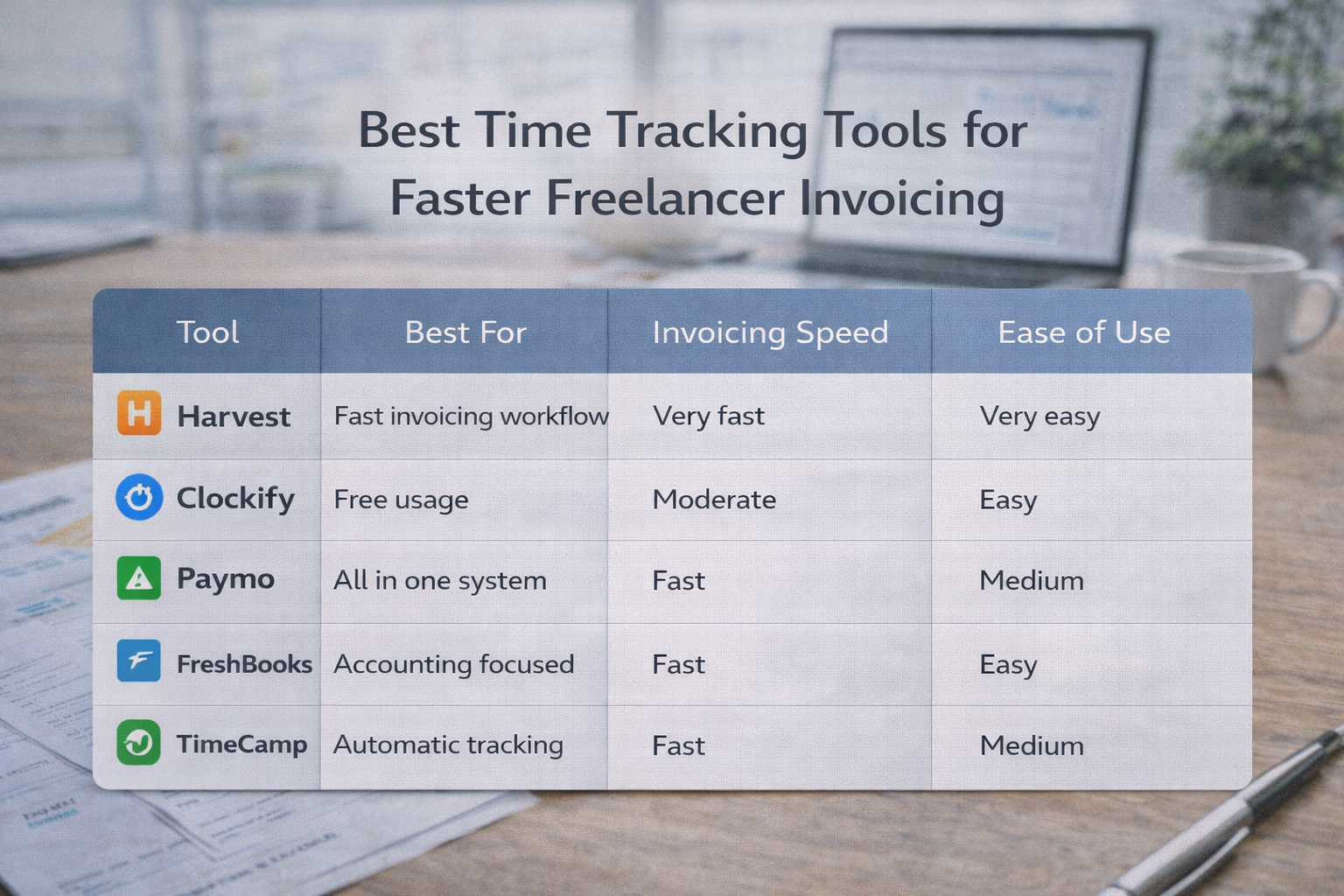
Tool | Best For | Invoicing Speed | Ease of Use |
|---|---|---|---|
Harvest | Fast invoicing workflow | Very fast | Very easy |
Clockify | Free usage | Moderate | Easy |
Paymo | All-in-one system | Fast | Medium |
FreshBooks | Accounting focused | Fast | Easy |
TimeCamp | Automatic tracking | Fast | Medium |
Frequently Asked Questions
Which time tracking software is best for freelancers?
Tools like Harvest, Paymo, and FreshBooks are popular because they combine time tracking and invoicing in one system.
Can time tracking software create invoices automatically?
Yes. Most modern tools allow you to convert tracked time into invoices with a few clicks, reducing manual work.
Is QuickBooks integration necessary for freelancers?
Not always, but time-tracking software with QuickBooks integration helps automate accounting tasks and reduce manual data entry.
Does time tracking improve payment speed?
Yes. Faster invoicing leads to quicker payments because there are fewer delays between completing work and sending invoices.
Can I use free invoicing tools?
Yes. Tools like Clockify offer free plans, but paid tools often provide better automation and faster workflows.
Related Posts
Choose Time Tracking Software That Syncs with QuickBooks
Choose time tracking software with QuickBooks integration that keeps data accurate, avoids sync issues, and protects your workflow.
How Time Tracking Software Automates HR Tasks Without Stress
Automate HR tasks like attendance, payroll, and reporting with time tracking software without making employees feel watched.