Best Time Tracking Tools for Faster Freelancer Invoicing
Find the best time tracking software for freelancers that helps create invoices faster, reduce manual work, and improve billing accuracy with simple workflows.
Freelancers lose an average of $10,000+ in billable hours every year simply by forgetting to start a timer. The right time tracking software fixes that automatically, so you get paid for every minute you work. The best time tracking software for freelancers makes it easy to log billable hours, separate client projects, and turn tracked time into invoices. Toggl Track is the top overall pick: free for up to 5 users, works on every device, and never takes screenshots. For freelancers who want the fastest route from tracked hours to paid invoices, Harvest is the better fit.
Research from Fiverr shows freelancers with structured time tracking spend 60% less time on invoice prep. Separately, 88% of freelancers and contractors now use time tracking tools, and 80% say it builds stronger trust with clients (TimeChamp, 2026).
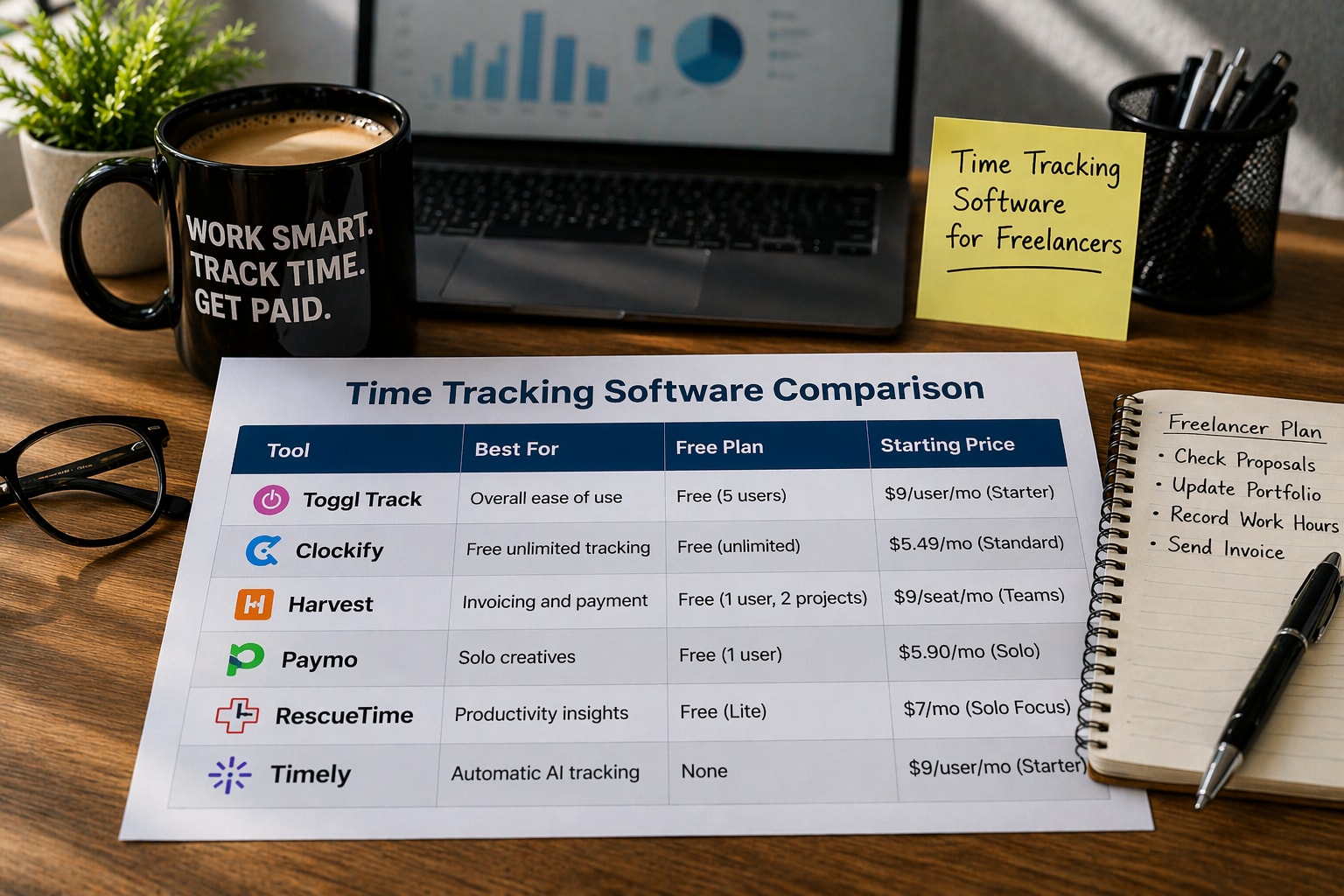
Tool | Best For | Free Plan | Starting Price |
Toggl Track | Overall ease of use | Free (5 users) | $9/user/mo (Starter) |
Clockify | Free unlimited tracking | Free (unlimited) | $5.49/mo (Standard) |
Harvest | Invoicing and payment | Free (1 user, 2 projects) | $9/seat/mo (Teams) |
Paymo | Solo creatives | Free (1 user) | $5.90/mo (Solo) |
RescueTime | Productivity insights | Free (Lite) | $7/mo (Solo Focus) |
Timely | Automatic AI tracking | None | $9/user/mo (Starter) |
Free for up to 5 users. One-click timer on web, desktop, and mobile. 145+ integrations including QuickBooks, Xero, Asana, and Slack. Billable rates and timesheet approvals on the Starter plan at $9/user/month. No screenshots, no monitoring.
Free forever with unlimited projects and unlimited clients. Billable rate tracking included. Invoicing is available from the Standard plan at $5.49 per month. Works well for freelancers handling multiple clients at once.
Tracks time, creates branded invoices, and collects payment via Stripe or PayPal. Syncs to QuickBooks Online and Xero. Free plan covers 1 user and 2 projects. Teams plans start at $9/seat/month. Best if invoicing is your main priority.
Combines project management, time tracking, and invoicing. Free plan covers 1 user. Solo plan at $5.90/month supports 3 clients and 5 projects. Includes file proofing for design review. Good for graphic designers, architects, and writers.
Runs in the background automatically. No timers to start or stop. Shows how much time you spend on each app and website. Free Lite tier. Paid plans from $7/month. Best for freelancers who want honest data before setting client rates.
AI records all your activity in the background. AutoSheet drafts your timesheets from that data. Only you see your full timeline. From $9/user/month. Best for consultants and coaches who regularly forget to start timers.
Billable vs. non-billable tracking: separate client work from admin time
Multi-client project organisation: keep time logged cleanly by client and project
Invoicing or accounting integration: QuickBooks, Xero, or FreshBooks connection
Cross-device access: log time from laptop, phone, or browser extension
Free or low-cost plan: most freelancers are solo; pricing must match that
Timer reminders: the top complaint from freelancers is forgetting to start tracking.
The r/freelance community recommends what many call the two-timer method: one timer for your total work session and one for specific client work. This catches any gaps. The most common complaint is forgetting to start or stop timers. One user estimated losing over $10,000 in billable hours in a year from that habit alone.
The general advice is to pair an automatic time tracker like RescueTime or Timely with a manual one like Toggl or Clockify. Use the automatic tool to see everything. Use the manual one to build clean reports for clients.
For most freelancers, Toggl Track is the best starting point. It's free, works everywhere, and never monitors you. If invoicing is your main pain point, switch to Harvest. If you keep forgetting to track, try Timely. Start with a free trial and track a real week of work before committing to any paid plan.
Frequently Asked Questions
It is not required, but it directly increases the billable hours you recover, cuts invoice prep time, and gives clients confidence in your billing.
Toggl Track (free for up to 5 users) and Clockify (free for unlimited users) are the most recommended. Both include multi-client project tracking at no cost.
By using project-level tracking with separate tags or workspaces per client. Most tools let you generate a per-client report at the end of the month.
Find the best time tracking software for freelancers that helps create invoices faster, reduce manual work, and improve billing accuracy with simple workflows.
Choose time tracking software with QuickBooks integration that keeps data accurate, avoids sync issues, and protects your workflow.
Automate HR tasks like attendance, payroll, and reporting with time tracking software without making employees feel watched.
Improve team productivity with time tracking software. Track work, reduce delays, and help SMEs manage workflows with better visibility and control.