
Best Time Tracking Tools for Faster Freelancer Invoicing
Find the best time tracking software for freelancers that helps create invoices faster, reduce manual work, and improve billing accuracy with simple workflows.
Manually copying hours into QuickBooks wastes time and causes payroll errors. The right time tracking software syncs your hours, invoices, and payroll automatically, saving your team hours every week. QuickBooks Time (formerly TSheets) has the deepest QuickBooks integration of any tool available. It is also included free with QuickBooks Payroll Premium and Elite plans. If you already pay for one of those plans, you get a full-time tracking tool at no extra cost.
Several third-party tools also connect well with QuickBooks at lower price points. The key difference to check is whether the tool supports QuickBooks Online only or both QuickBooks Online and QuickBooks Desktop. Most tools only support QuickBooks Online. Only Hubstaff, Replicon, and QuickBooks Time support both.
Use this comparison to see which time tracking tools support QuickBooks Online and QuickBooks Desktop, and what each option starts at:
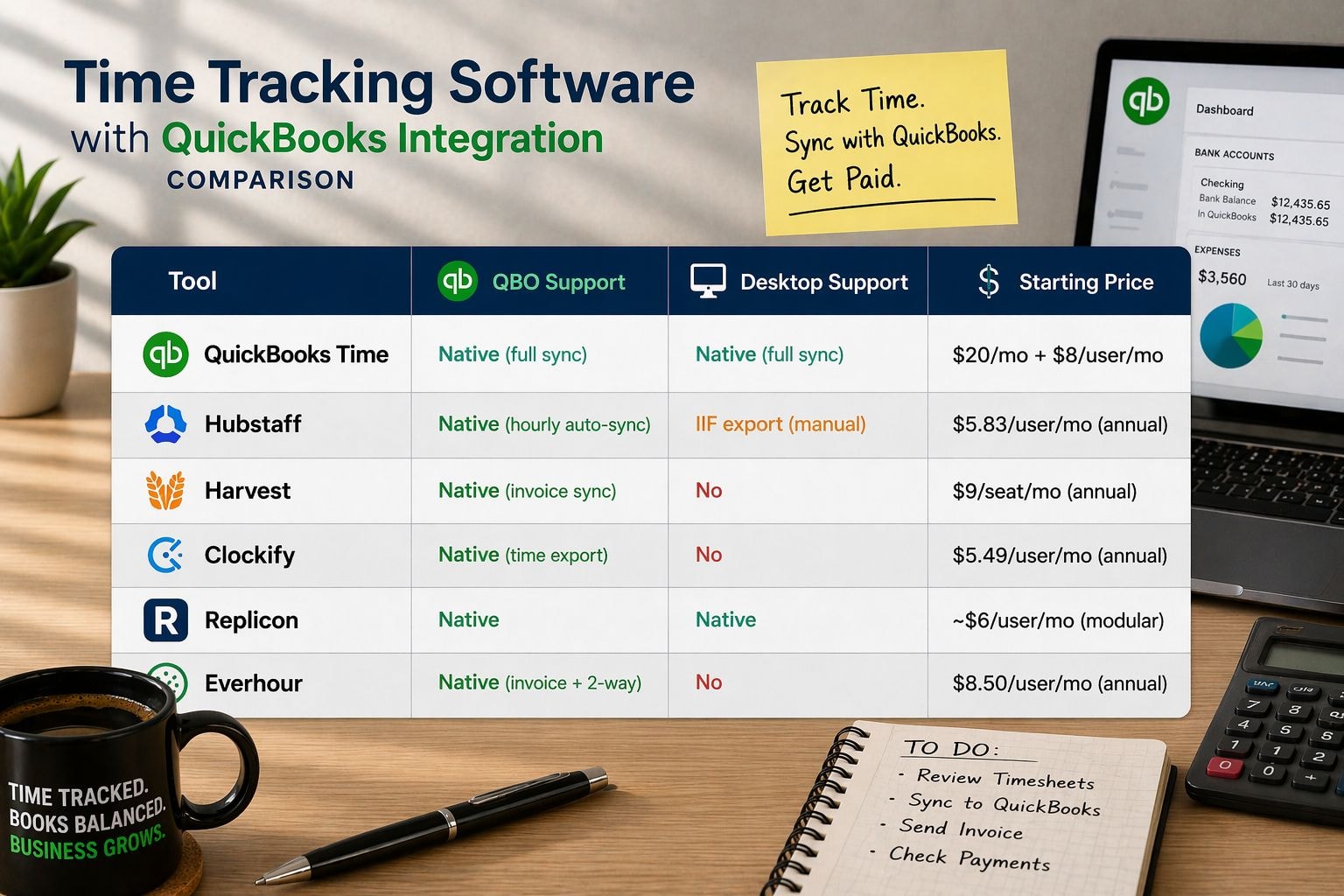
Tool | QBO Support | Desktop Support | Starting Price |
|---|---|---|---|
QuickBooks Time | Native (full sync) | Native (full sync) | $20/mo + $8/user/mo |
Hubstaff | Native (hourly auto-sync) | IIF export (manual) | $5.83/user/mo (annual) |
Harvest | Native (invoice sync) | No | $9/seat/mo (annual) |
Clockify | Native (time export) | No | $5.49/user/mo (annual) |
Replicon | Native | Native | ~$6/user/mo (modular) |
Everhour | Native (invoice + 2-way) | No | $8.50/user/mo (annual) |
QuickBooks Time is the safest choice for full sync, while Harvest, Clockify, and Everhour are better suited for QuickBooks Online invoice or time export workflows.
This is Intuit's own time tracking product. It syncs directly with QuickBooks Payroll, QuickBooks Online, and QuickBooks Desktop. Standalone plans start at $20/month plus $8 per user per month. Included free with QuickBooks Payroll Premium and Elite. Includes GPS, kiosk mode, and shift scheduling.
Syncs time entries to QuickBooks Online automatically every hour. QuickBooks Desktop is supported via IIF file export (manual process). Requires the Grow plan at $7.50/user/month (annual) for integrations. Also includes GPS, payroll, and scheduling.
Copies invoices and payments from Harvest to QuickBooks Online automatically. Best for agencies that bill clients by the hour. Requires the Teams plan at $9/seat/month. No QuickBooks Desktop support.
Exports tracked time to QuickBooks Online in bulk. Requires the Standard plan at $5.49/user/month. This is the cheapest paid option with a QBO connection. No QuickBooks Desktop support.
Supports both QuickBooks Online and Desktop via native connectors. Modular pricing from around $6/user/month. Built for larger companies with government contracts or global teams. DCAA-compliant.
Creates draft invoices in QuickBooks Online from tracked project time. Invoice payment status syncs back from QBO to Everhour. Requires the Team plan with a 5-seat minimum at $8.50/user/month (annual). No Desktop support.
You connect accounts through QuickBooks OAuth (for Online) or API key. No manual file export needed for Online integrations.
You map employees, projects, and service items between both platforms before your first sync.
Most tools push data one way: from the time tracker to QuickBooks. A few tools (Everhour, Timely) sync invoice payment status back.
Hubstaff syncs every hour automatically. Most other tools sync on demand or when you export an invoice.
Data that syncs typically includes: time entries, billable amounts, client and project names, pay rates, and invoice records.
This table shows which time tracking tools connect with QuickBooks Online, QuickBooks Desktop, and how each integration handles time or invoice data:
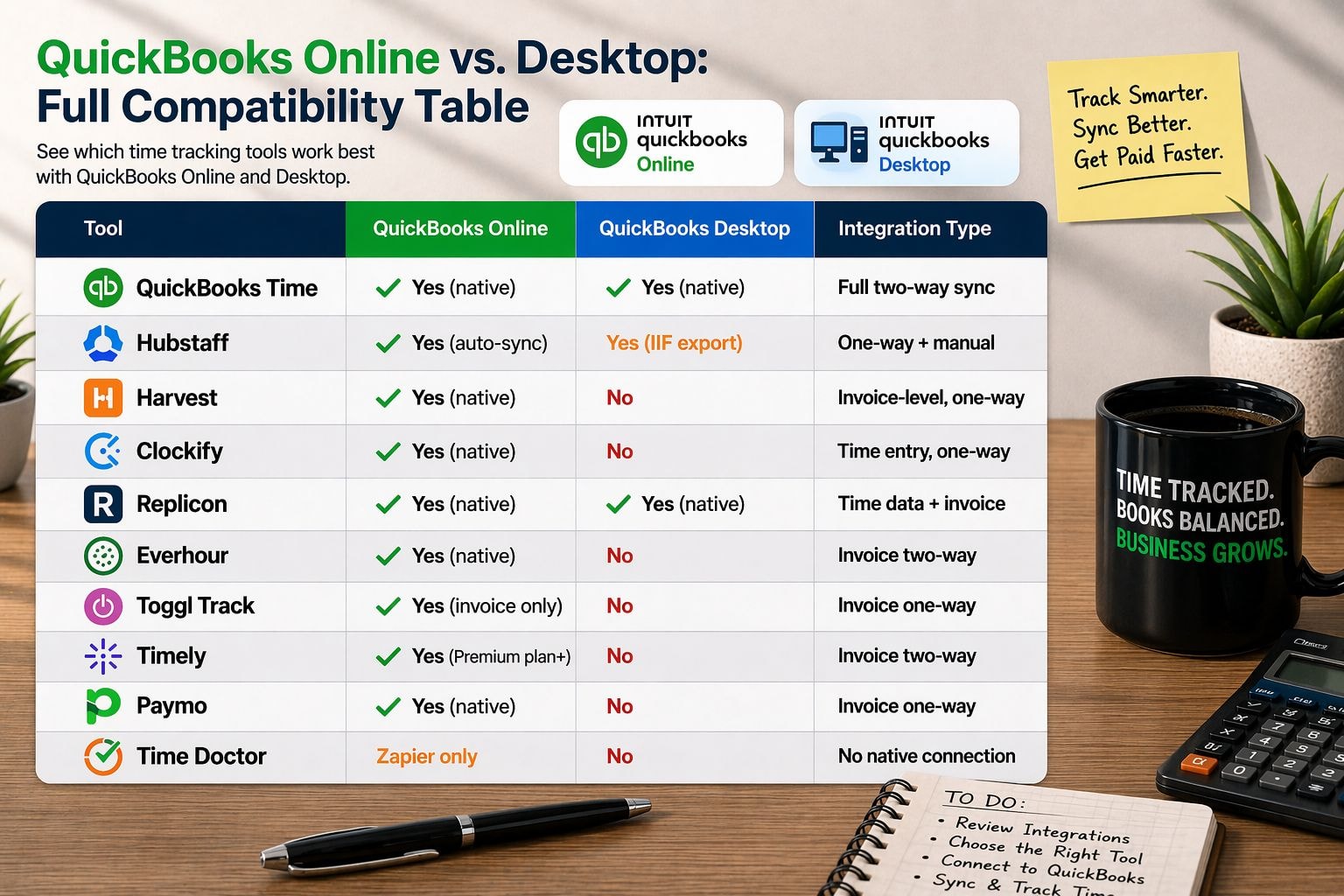
Tool | QuickBooks Online | QuickBooks Desktop | Integration Type |
|---|---|---|---|
QuickBooks Time | Yes (native) | Yes (native) | Full two-way sync |
Hubstaff | Yes (auto-sync) | Yes (IIF export) | One-way + manual |
Harvest | Yes (native) | No | Invoice-level, one-way |
Clockify | Yes (native) | No | Time entry, one-way |
Replicon | Yes (native) | Yes (native) | Time data + invoice |
Everhour | Yes (native) | No | Invoice two-way |
Toggl Track | Yes (invoice only) | No | Invoice one-way |
Timely | Yes (Premium plan+) | No | Invoice two-way |
Paymo | Yes (native) | No | Invoice one-way |
Time Doctor | Zapier only | No | No native connection |
Choose the tool based on the type of QuickBooks connection you need. Desktop users should confirm native support first, while Online users have more flexible invoice and time-sync options.
For most small businesses, QuickBooks Time is the safest choice — it's built by Intuit and syncs natively with everything. For tighter budgets, Clockify at $5.49/user/month is the most affordable QuickBooks Online option. For field teams, Hubstaff adds GPS on top of QuickBooks sync. Pick based on your team size, QuickBooks version (Online vs Desktop), and budget.
Yes, through QuickBooks Time (formerly TSheets). It is included free with QuickBooks Payroll Premium and Elite. It is also available as a standalone subscription.
Yes. Intuit bought TSheets in 2018 and renamed it QuickBooks Time in 2020. All features and data carried over. The product is the same tool under a new name.
Clockify at $5.49/user/month (Standard plan) is the cheapest option with a QuickBooks Online connection. If you already subscribe to QuickBooks Payroll Premium or Elite, QuickBooks Time is included at no extra cost.
QuickBooks Time syncs directly with QuickBooks Payroll. Hubstaff, Gusto, and Paychex integrations also let most major time trackers export payroll-ready data.
Find the best time tracking software for freelancers that helps create invoices faster, reduce manual work, and improve billing accuracy with simple workflows.
Choose time tracking software with QuickBooks integration that keeps data accurate, avoids sync issues, and protects your workflow.
Automate HR tasks like attendance, payroll, and reporting with time tracking software without making employees feel watched.

Improve team productivity with time tracking software. Track work, reduce delays, and help SMEs manage workflows with better visibility and control.