
Is Time Tracking Software Worth It for Small Teams
Many people assume time tracking is only for large companies. That is not true. Small teams often feel they can manage work without tools. In reality, this is where small gaps begin to form. Missed tasks, unclear ownership, and uneven workload show up quickly.
Time-tracking software helps address these issues early.
Why Small Teams Start Facing Challenges
When teams grow beyond 3 to 4 people, work becomes less visible.
Multiple tasks are handled across team members
Work overlaps without a clear ownership defined
No clear idea of the time spent daily
Delays happen without clear reasons
Decisions made based on assumptions
These problems grow as work increases.
Is Time Tracking Software Only for Large Companies
No. Large companies use it at scale, but small teams benefit just as much. In fact, small teams see faster impact because:
Fewer people mean quicker adoption
Problems are easier to identify early
Changes can be implemented faster
Visibility improves immediately across the team
Less resistance compared to larger teams
Time-tracking software for Small and Medium Businesses is designed to work without adding complexity.
How Time Tracking Software Helps Small Teams
Time tracking software brings clarity to daily work.
Track time across tasks and projects easily
Understand where time is actually spent
Identify workload gaps across team members
Reduce confusion around task ownership
Keep records consistent across all projects
This helps teams stay organised as they grow.
Accountability Without Micromanagement
Small teams often avoid time tracking because they think it leads to micromanagement, but the real issue is how it is used. Accountability should mean clear task ownership, visible progress, shared deadlines, and data-driven decisions, not constant follow-ups. It should focus on outcomes rather than tracking every minute of activity or the effort behind it. When used this way, time tracking software supports accountability without adding pressure.
Workflow Comparison for Small Teams
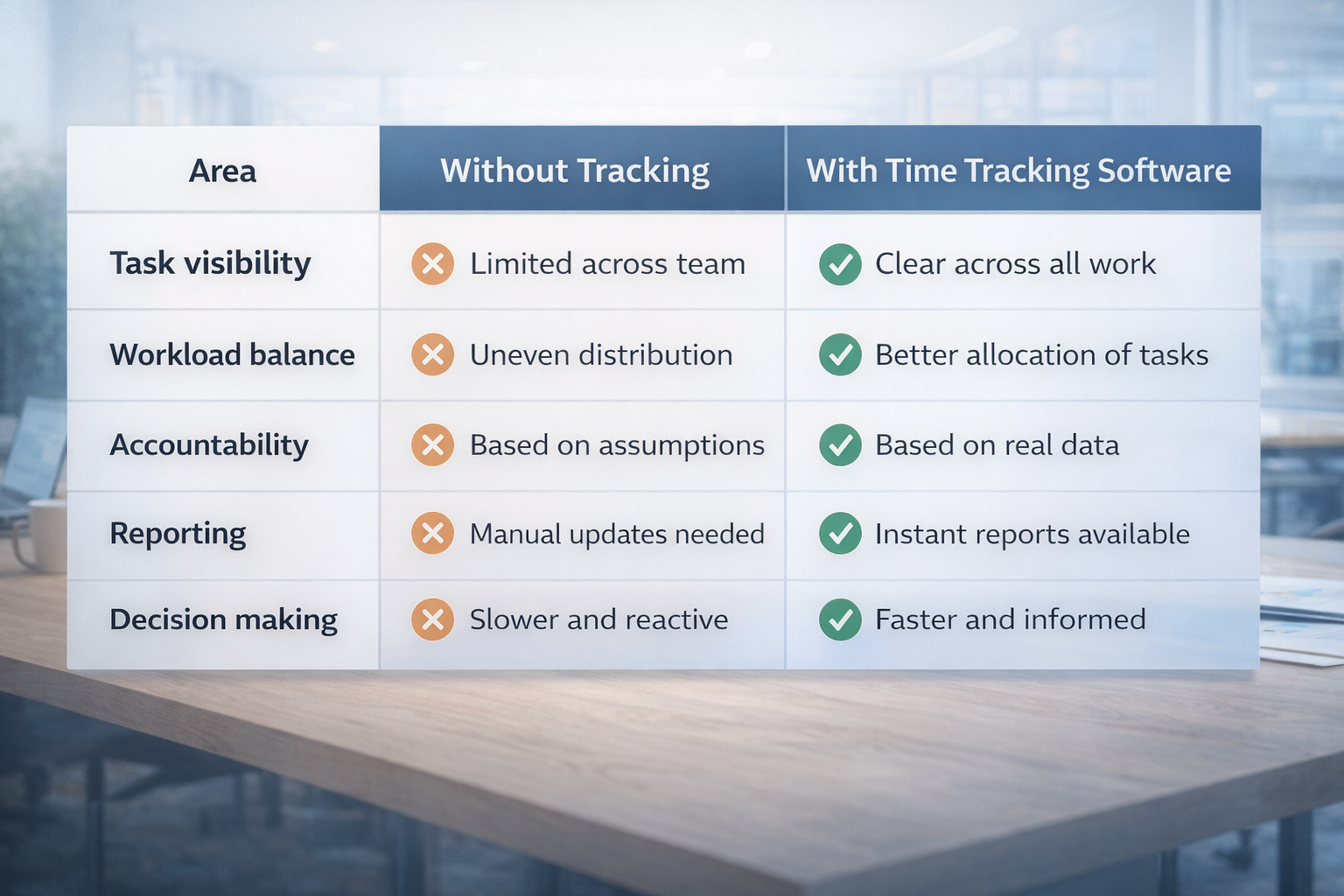
Here is how work changes with and without tracking:
Area | Without Tracking | With Time Tracking Software |
Task visibility | Limited across the team | Clear across all work |
Workload balance | Uneven distribution | Better allocation of tasks |
Accountability | Based on assumptions | Based on real data |
Reporting | Manual updates needed | Instant reports available |
Decision making | Slower and reactive | Faster and informed |
As the workload increases, this gap becomes more visible.
When Small Teams Should Start Using It
Not every team needs it from day one. But it becomes useful when:
Team handles multiple projects at once
Work starts getting delayed without clarity
No visibility into time spent on tasks
Tasks overlap between team members often
Planning becomes harder as the workload increases
At this stage, time tracking software becomes necessary.
Where It Supports Daily Operations
Time-tracking software for SMEs helps small teams stay consistent.
Builds structure in daily work processes
Reduces dependency on manual updates and tracking
Helps teams plan work more effectively
Improves coordination between team members
Keeps operations smooth as workload grows
It becomes part of how the team works.
Frequently Asked Questions
Is time tracking software worth it for small teams?
Yes. It helps improve visibility, manage workload, and reduce confusion even in teams of under 10 people.
Can small teams benefit from time tracking software?
Yes. Small teams often benefit more quickly because they can adapt and fix issues early.
Does it lead to micromanagement?
No, if used correctly. It should focus on tasks and outcomes, not constant monitoring.
How does it improve accountability?
It shows who is responsible for tasks and how work progresses using real data.
Is it difficult for small teams to adopt?
No. Most tools are simple and can be implemented without a complex setup.
Related Posts

Best Time Tracking Tools for Faster Freelancer Invoicing
Find the best time tracking software for freelancers that helps create invoices faster, reduce manual work, and improve billing accuracy with simple workflows.
Choose Time Tracking Software That Syncs with QuickBooks
Choose time tracking software with QuickBooks integration that keeps data accurate, avoids sync issues, and protects your workflow.