
Time Tracking Software vs Manual Tracking Explained
Manual tracking feels simple at first. You note down hours, update a sheet, and move on. But over time, gaps start showing. You forget entries, estimate hours, and spend time fixing data.
Time tracking software solves this by capturing time as work happens and keeping everything structured.
How Manual Tracking Affects Daily Work
Manual tracking depends on consistency, which is hard to maintain.
Writing time after work ends
Estimating hours instead of tracking
Using multiple sheets or tools
Updating data at the end of the week
Missing small time entries often
These issues slowly affect billing and workflow.
How Time Tracking Software Improves This
Time-tracking software removes the dependency on memory.
Track time during active work
Store entries automatically in the system
Organize time by project clearly
Generate reports without extra steps
Keep data consistent across tasks
This leads to cleaner data and fewer corrections.
Direct Comparison of Both Methods
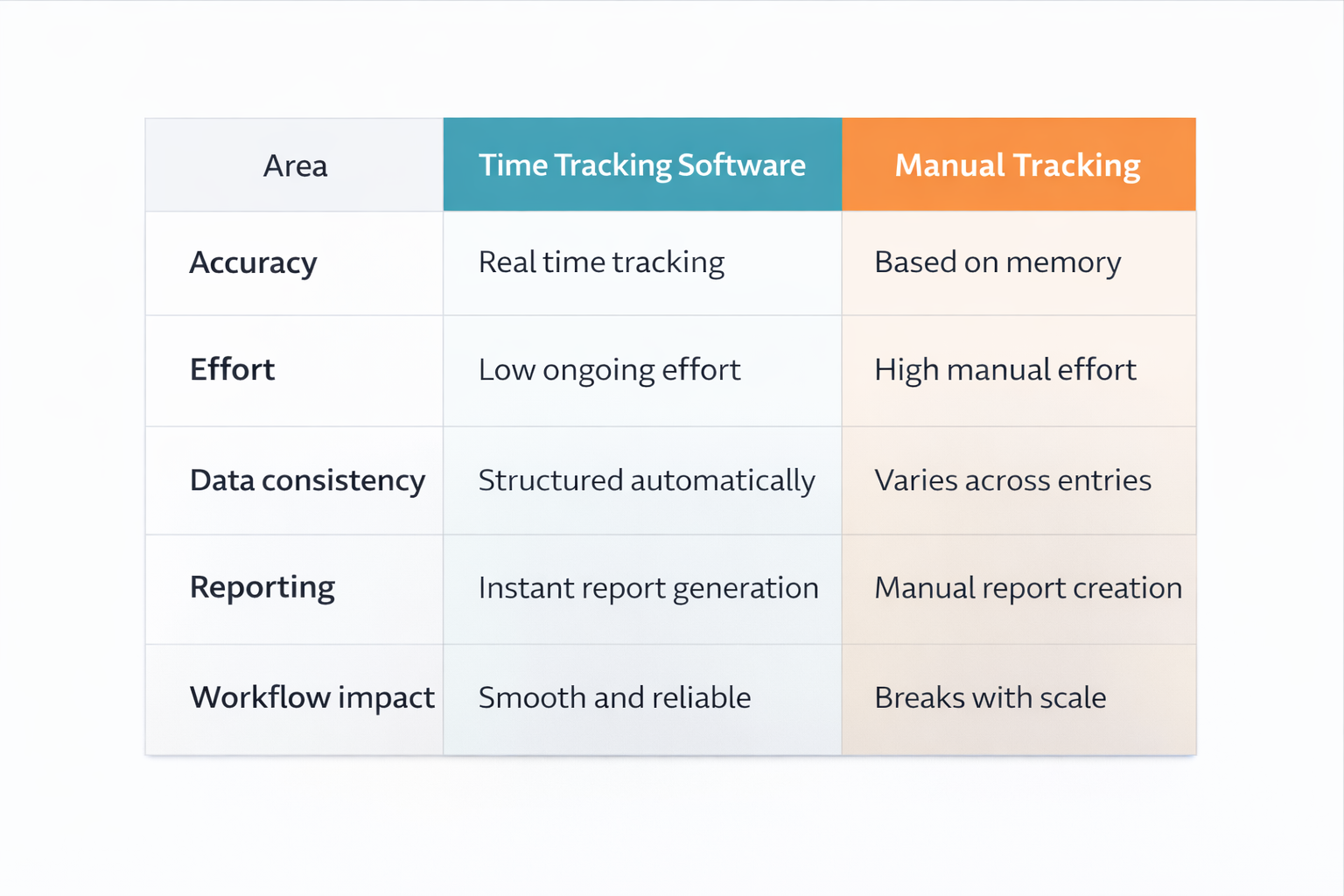
Below is a simple comparison to clarify the difference.
Area | Time Tracking Software | Manual Tracking |
|---|---|---|
Accuracy | Real time tracking | Based on memory |
Effort | Low ongoing effort | High manual effort |
Data consistency | Structured automatically | Varies across entries |
Reporting | Instant report generation | Manual report creation |
Workflow impact | Smooth and reliable | Breaks with scale |
This difference becomes more visible as your workload and number of projects increase.
How Time Tracking Software Streamlines Operations
The benefit is not just better tracking. It improves how work flows.
1. Clear Work Visibility
See time spent across tasks
Track progress across projects
Identify delays early
2. Better Billing Accuracy
Bill based on actual time
Reduce errors in invoices
Avoid disputes with clients
3. Improved Work Planning
Understand time usage patterns
Adjust workload when needed
Focus on important tasks
4. Reduced Manual Work
No need for manual updates
Less time spent fixing errors
Faster access to reports
5. Consistent Data Across Work
Same data used everywhere
No mismatch between records
Reliable information for decisions
This is where time tracking software becomes part of daily operations, not just a tool.
Where Manual Tracking Still Works
Manual tracking can still work in simple situations.
Single project or client work
Fixed pricing without hourly billing
Low workload environments
No need for detailed reports
Outside of this, it becomes difficult to manage.
When You Should Move to Software
You should consider switching when:
You forget to log time often
Your billing depends on accuracy
You handle multiple projects
You spend time fixing data
You need reliable reports
At this point, time tracking software becomes a better option.
Frequently Asked Questions
Is time tracking software better than manual tracking?
Yes, for most workflows. It improves accuracy and reduces the effort needed to manage time data.
How does time tracking software help operations?
It provides structured data, reduces errors, and improves planning across tasks and projects.
Can individuals benefit from time tracking software?
Yes. It helps track work accurately and reduces time spent managing records.
Is manual tracking still reliable?
It works for simple tasks but becomes inconsistent as workload grows.
Does time tracking software require training?
Most tools are simple and easy to start using without much setup.
Related Posts

Best Time Tracking Tools for Faster Freelancer Invoicing
Find the best time tracking software for freelancers that helps create invoices faster, reduce manual work, and improve billing accuracy with simple workflows.
Choose Time Tracking Software That Syncs with QuickBooks
Choose time tracking software with QuickBooks integration that keeps data accurate, avoids sync issues, and protects your workflow.