
Choose the Best Time Tracking Software for Workflow
Choosing the right time tracking software is not about picking the tool with the most features. It is about choosing something your team will actually use every day.
Most teams try a tool, stop using it within a week, and move on. The issue is not the tool. It is the mismatch with how they work.
Start With Your Workflow
Before selecting any time tracking software, understand how your team works.
Do you handle client projects or internal tasks
Do you need billable hours
Does your team switch tasks often
Do you need reports for clients or internal use
Time tracking tools work best when they match real work patterns. They help teams see how time is spent and improve planning and delivery.
Choose the Right Tracking Method
Not every team should track time the same way.
Manual tracking
Simple start and stop timers. Works well for small teams.
Automatic tracking
Tracks work in the background. Useful when people forget to log time.
Time sheets
More structured tracking with approvals. Common for operations and payroll. Choose the method your team will follow daily. If it feels like extra work, it will not last.
Keep It Simple
Ease of use matters more than features. If a tool takes too many steps, people stop using it. Simple tools with clean layouts and quick actions improve adoption and reduce effort.
A good time tracking software should:
Take seconds to log time
Be easy to understand
Not interrupt work
Look for Integration With Your Tools
Your tracking tool should connect with your existing setup. It should work with:
Project management tools
Communication tools
Accounting or billing systems
Integration reduces manual work and errors while improving workflow efficiency.
Focus on Useful Reports
Reports are the real value. Your time tracking software should help you understand:
Which tasks take the most time
Which projects are profitable
Where time is being wasted
Clear data helps improve planning, pricing, and resource use.
Choose Tools Built for SMEs
Avoid tools that are too complex for your team. Time Tracking Software for Small and Medium Business should focus on:
Easy setup
Simple dashboards
Basic automation
Clear reporting
SMEs use time tracking to improve productivity, manage billable hours, and control costs.
Avoid Over-Monitoring
Some tools track every click or screen activity. This can reduce trust and make teams uncomfortable. Good tracking should support work, not feel like surveillance.
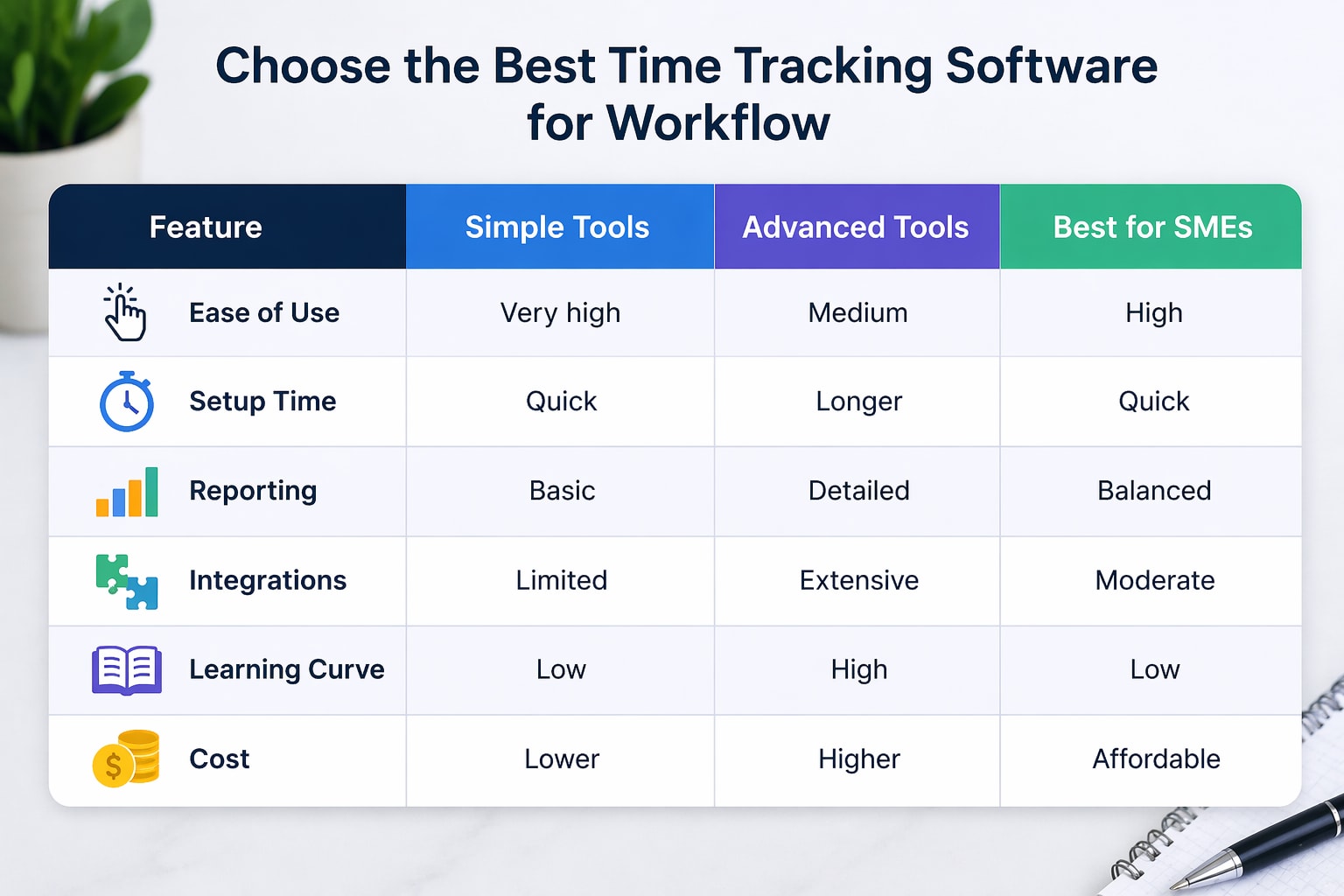
Feature | Simple Tools | Advanced Tools | Best for SMEs |
|---|---|---|---|
Ease of Use | Very high | Medium | High |
Setup Time | Quick | Longer | Quick |
Reporting | Basic | Detailed | Balanced |
Integrations | Limited | Extensive | Moderate |
Learning Curve | Low | High | Low |
Cost | Lower | Higher | Affordable |
What Works Best for Different Teams
Freelancers → simple timers
Agencies → project tracking with billing
Growing teams → structured tracking with reports
Time Tracking Software for SMEs usually needs a balance of simplicity and control.
What is time tracking software used for?
It tracks how much time is spent on tasks and projects. This helps improve planning, billing, and productivity.
Is time tracking software useful for small businesses?
Yes. Small businesses use it to manage time, improve efficiency, and track billable work without adding extra processes.
Do employees like using time tracking tools?
Most teams accept it when the tool is simple and not used for monitoring.
Should I use automatic or manual tracking?
Manual works for disciplined teams. Automatic works if people forget to track time
How often should time be tracked?
Daily tracking gives the most accurate data. Weekly tracking often leads to guesswork.
What should SMEs focus on in a tool?
Ease of use, reporting, integrations, and simple automation are enough.
Can time tracking improve productivity?
Yes. It shows where time is spent and helps teams reduce waste and improve focus.
Related Posts

Best Time Tracking Tools for Faster Freelancer Invoicing
Find the best time tracking software for freelancers that helps create invoices faster, reduce manual work, and improve billing accuracy with simple workflows.
Choose Time Tracking Software That Syncs with QuickBooks
Choose time tracking software with QuickBooks integration that keeps data accurate, avoids sync issues, and protects your workflow.